
RDEL #133: Does using AI to code come at the cost of learning?
Not all AI usage is equal: developers who asked conceptual questions scored 65-86% on skills tests, while those who only delegated code generation scored 24-39%.
Welcome back to Research-Driven Engineering Leadership. Each week, we pose an interesting topic in engineering leadership and apply the latest research in the field to drive to an answer.
Every time a developer picks up a new library, joins a new codebase, or encounters an unfamiliar pattern, they’re building skills they’ll rely on long after the task is done. If AI shortcuts that process, what gets lost? This week we ask: Does using AI to code faster come at the cost of actually learning?
The context
Most research on AI-assisted coding has focused on productivity: how much faster developers ship, how many more pull requests they close, how much code they produce. And the results are generally positive — especially for junior developers, who tend to see the largest speed gains. But there’s an implicit assumption baked into those findings: that the developer is working on something they already know how to do.
In practice, engineering work constantly requires learning new things — a new framework, a new API, a new concurrency model. These are the moments where skill formation happens. And they’re also the moments where AI assistance is most tempting, because the developer doesn’t yet know enough to move quickly on their own. The question is whether leaning on AI during these learning moments helps engineers ramp up faster, or quietly prevents them from developing the understanding they need to work independently — and to supervise AI-generated code down the line.
The research
Researchers at Anthropic ran a randomized controlled experiment with 52 professional developers. Participants completed two coding tasks using the Python Trio library — an asynchronous programming framework none of them had used before. Half had access to a GPT-4o-powered coding assistant; the other half worked with only documentation and web search. Afterward, all participants took a 14-question quiz (without AI) covering conceptual understanding, code reading, and debugging.
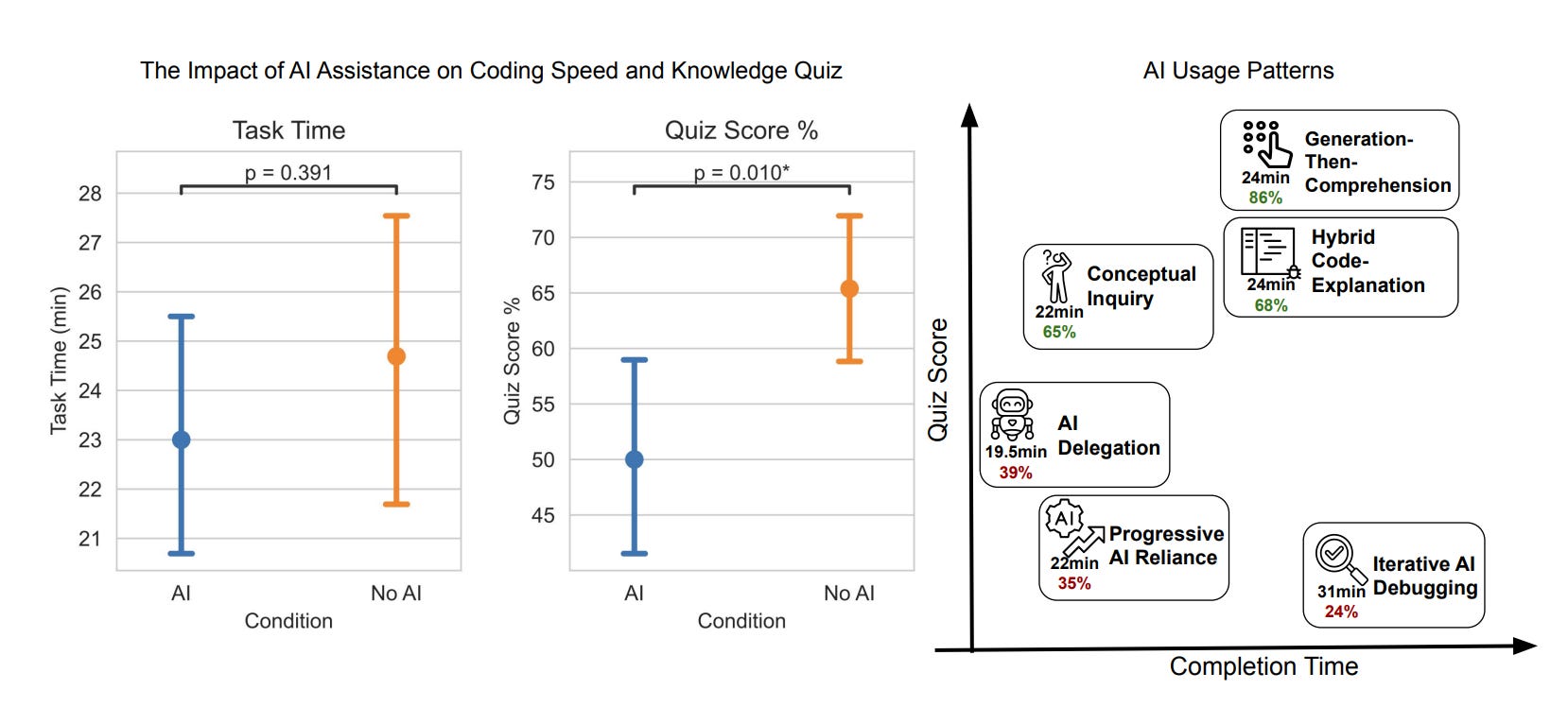
Key findings:
AI users scored 17% lower on the skills quiz. The AI group averaged a 4.15-point gap on a 27-point quiz (Cohen’s d=0.738, p=0.01) — and this held across all experience levels.
AI didn’t meaningfully speed things up. Despite having an assistant that could generate complete, correct code, there was no significant improvement in task completion time (p=0.391). Some participants spent up to 11 minutes — nearly a third of the task window — just interacting with the assistant.
The biggest skill gap was in debugging. The control group encountered a median of 3 errors during the task versus just 1 for the AI group. Working through those errors forced deeper engagement with the underlying concepts — and showed up as the largest score difference on the quiz.
Not all AI usage patterns were equal. Three “high-scoring” interaction patterns (65-86% on the quiz) involved cognitive engagement — asking conceptual questions or requesting explanations alongside code. Three “low-scoring” patterns (24-39%) were characterized by heavy delegation — pasting AI output without engaging with it.
AI users felt it too. The control group self-reported higher learning, and several AI-assisted participants said they wished they’d paid more attention, with some describing themselves as feeling “lazy.”
The application
This study provides some of the clearest experimental evidence yet that AI-assisted productivity and skill development can be in direct tension. The developers who leaned on AI the heaviest finished tasks without building the understanding needed to work independently — or to catch errors in AI-generated code. But the finding isn’t “don’t use AI.” The high-scoring interaction patterns show that developers who stayed cognitively engaged while using AI preserved their learning outcomes. The difference isn’t whether you use AI — it’s how.
Here’s how to apply these findings:
Distinguish between “performance tasks” and “learning tasks.” When an engineer is working on something they already understand, AI can accelerate delivery. But when they’re onboarding to a new codebase, learning a new framework, or encountering unfamiliar patterns, encourage them to use AI for explanations and conceptual questions — not just code generation. The interaction pattern matters more than the tool.
Treat debugging as a skill-building feature, not a bug. This study found that encountering and resolving errors independently was one of the strongest drivers of learning. Resist the instinct to optimize all friction out of the development process. For junior engineers especially, struggling through errors with a new library is how concepts stick. Consider reserving AI-free time for these formative moments.
Coach your team on high-signal AI interaction patterns. Share the distinction between high- and low-scoring patterns from this research. Asking AI “explain how this concurrency model works” produces very different learning outcomes than “write the function for me.” Promote patterns like generation-then-comprehension (generate code, then ask follow-up questions to understand it) and conceptual inquiry (ask conceptual questions, resolve errors independently).
—
Here’s to building skills that last — even in an AI-assisted world. Happy Research Tuesday!
Lizzie
Yes it does